

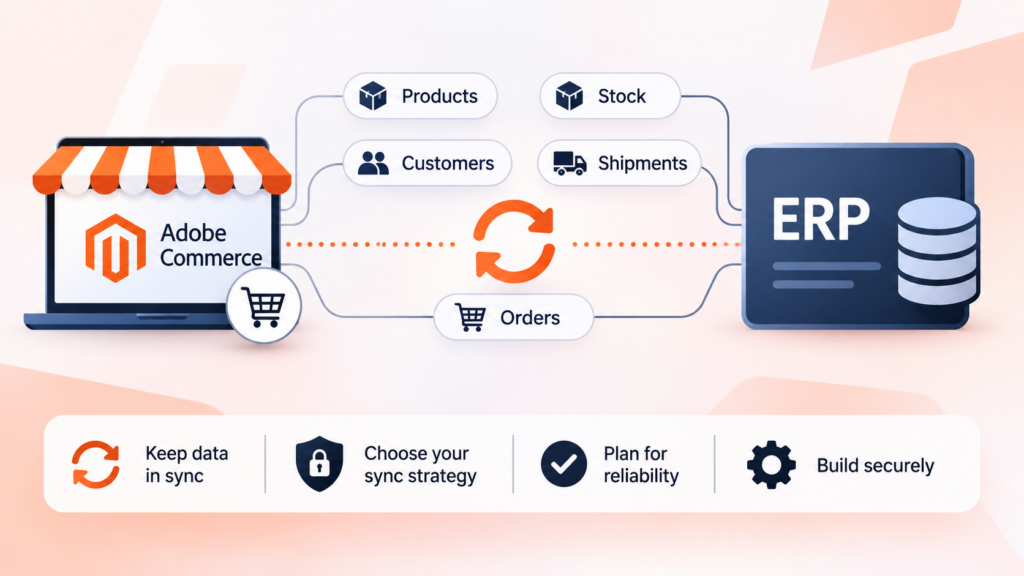
Magento ERP integration keeps products, stock, orders, customers and shipments in sync between your store and the system that runs your back office. Adobe’s integration starter kit covers those five data flows, using events for asynchronous sync and a synchronous webhook when the store needs an answer in the moment.
Key takeaways
- Adobe documents five data flows for its integration starter kit: customers, orders, products, shipments and stock. Not every flow supports create, update and delete.
- Two delivery styles exist: event-based integrations (asynchronous) and real-time integrations (a synchronous webhook that can change how a Commerce flow behaves).
- For stock, Adobe’s own flow describes a daily full sync plus delta updates when source quantity changes or stock is allocated.
- Ingestion webhooks in the starter kit are not authenticated by default. You add the check yourself.
- Adobe’s page says App Management is the preferred tool for creating and updating Commerce extensions, and positions the starter kit as an accelerator for scaffolding.
Most ERP projects go wrong before anyone writes code. The team agrees that “the ERP and the store should be connected,” then discovers six months later that nobody decided which system owns the price, what happens when a stock number is wrong for ten minutes, or who gets alerted when an order fails to post. The wiring is the easy part. The decisions are the project.
This guide walks through how a Magento (Adobe Commerce) to ERP integration is structured, using Adobe’s own integration starter kit documentation as the reference for what the platform gives you. Where something is our own recommendation rather than a documented fact, we say so. The documentation facts were checked on the date at the bottom of the page.
What does Magento ERP integration actually involve?
An ERP is the system a business uses to run its back office: stock across warehouses, purchasing, accounting, fulfilment status. A storefront sells things. The two disagree about reality all the time unless something keeps them aligned, and that “something” is the integration.
In practice, the integration is a set of data flows. Each flow answers three questions: which system creates the record, which system is allowed to change it, and how quickly the other side has to find out. Adobe’s integration starter kit frames it the same way. Its documentation describes the path data takes as it travels between Adobe Commerce and your back-office system, object by object.
Adobe’s overview page describes the starter kit as a foundation for building custom integrations that support multichannel, global commerce for B2B, B2C and hybrid businesses. The same page lists a reference application for Microsoft Dynamics F&O and sections for installation, event-based integrations, real-time integrations, exposing Commerce data and enriching the shopping experience.
One caution before going further. Adobe’s overview page also states that App Management is the preferred tool for creating and updating Commerce extensions, and that the starter kit should be used as an accelerator for scaffolding your integration, with the resulting app defined, built and deployed through App Management. That’s a statement about tooling as of the page’s last update, so check the current page before you commit to a project structure.
Which data should move, and in which direction?
Adobe’s data flow overview lists five flows: customers, orders, products, shipments and stock. It also says plainly that not all of them support create, update and delete operations, and tells you to read each flow’s page for specifics. That sentence is worth taking seriously. A flow you assumed was two-way might only be one-way.
The table below pairs each flow with what Adobe’s pages actually describe and the decision you still have to make yourself. The right-hand column is our advice, not Adobe’s.
| Flow | What Adobe’s documentation describes | Decision you have to make |
|---|---|---|
| Orders | Created when a customer or guest makes a purchase; status can be changed manually by an admin in Commerce, or by an order flow in the back-office system, which then updates the status in Commerce | Which statuses the ERP is allowed to set, and what the customer sees for each |
| Stock | Stock source creation and changes, the relationship between a stock source and a website, and stock quantity updates, with full and delta updates from the back office | Which system is the source of truth for quantity, and how stale a number may be |
| Products | Product create, update and delete events appear in the event list | Which fields the ERP owns (price, cost, SKU) and which the storefront team owns (descriptions, images) |
| Customers | Customer and customer-group create, update and delete events appear in the event list | Whether accounts originate in the store, the ERP, or both |
| Shipments | Shipment create and update events appear under the order entity | Who generates tracking numbers and when the customer is notified |
Notice that nothing in that table says “sync everything.” That’s deliberate. Every flow you add is another thing that can fail at 2 a.m. A sensible first release often moves orders out and stock in, and adds the rest only when the business can name the problem each flow solves.
What does Adobe’s integration starter kit give you?
The starter kit is a code scaffold, not a finished connector. Adobe’s pages describe it in terms of runtime actions that you deploy with Adobe’s aio command-line tool. It gives you the plumbing and leaves the business logic to you.
Three building blocks appear in Adobe’s event-based documentation.
The consumer action. Its job is to route incoming events to the right event handler action, normally based on the name of the event. A consumer can be subscribed to events from one entity, such as products, or to several entities that belong to the same domain, such as order and shipment events together.
The event handler action. This holds the business logic for a change in one of the integrated systems. Adobe says its logic typically includes an API call that propagates the change to the other system. The consumer calls it synchronously and passes its response back up.
The ingestion action. This is an alternative way to get events into the integration when the third-party back-office application can’t meet the requirements of the Events Publishing API. Adobe gives the example of a calling system that can’t add custom headers to a request.
Alongside those, the real-time side provides a synchronous webhook action, with a reference implementation called check-stock. That one is worth a section of its own, because the difference between “tell me later” and “tell me now” is the single biggest design choice in the whole project.
Events or webhooks: which should you use?
Use events when the other side doesn’t need to answer before the shopper can carry on. Use a synchronous webhook when it does.
Events are the default for most ERP traffic. A product changes in the ERP, an event is published, the consumer routes it, the handler updates Commerce. Nobody is waiting at a screen for that to happen. If it takes a few seconds, or has to be retried, no customer notices.
A synchronous webhook is different in kind. Adobe describes the webhook folder as exposing a webhook that Commerce can invoke synchronously to affect the behaviour of a particular business flow. The reference example makes a real-time query to a third-party system to decide whether a product a shopper just placed in their cart is in stock. Adobe’s page says you must implement the stock-checking logic on an external service, and that the example hooks the observer for adding a product to the cart, receiving the cart ID and the items with their SKU and quantity.
That example is useful because it shows both the power and the cost. The store can ask the ERP a live question, and the ERP’s answer changes what the shopper sees. But a shopper is now waiting on your back office. If the ERP is slow, the add-to-cart is slow. If the ERP is down, you have to decide, in code, what the webhook returns.
Adobe’s documented responses are simple: a success response with the operation marked as success, and an exception response carrying a message. What your webhook does when the ERP times out is not something the documentation can decide for you. That’s a business rule: fail open and let the shopper add the item, or fail closed and block it. Pick on purpose.
As a rule of thumb (ours, not Adobe’s): keep synchronous calls out of the buying path unless the cost of being wrong is higher than the cost of being slow. Overselling a limited-run item might justify it. Syncing a product description does not.
Adobe also notes that webhooks are enabled by default in the starter kit and can be disabled by commenting out the webhook section of the app configuration file before deploying. If you don’t plan to use them, switch them off rather than carrying code paths you don’t test.
How should stock sync work?
Stock is where ERP integrations earn or lose their reputation, because stock errors turn directly into oversold orders or missing sales. Adobe’s stock data flow page describes the pattern clearly, and it’s a sound template even if you build your own.
On the Commerce side, Adobe lists these triggers: an admin or an API creating a new stock source, an admin changing a stock source, an admin changing the relationship between a stock source and a website, and an admin modifying a stock quantity in the Admin panel. Adobe’s own example of the last one is quickly overwriting a quantity during a flash sale where overselling is acceptable.
On the back-office side, the documented update methods are three. A daily full sync triggers a full stock update for each stock source. A change in source stock quantity triggers a delta stock update. A stock allocation triggers a delta stock update.
That combination is the lesson. Deltas keep the store fresh minute to minute. The daily full sync exists to repair drift, because deltas can be lost, applied out of order or rejected. If you only do deltas, small errors accumulate forever. If you only do full syncs, the data is stale for most of the day. Doing both is a deliberate belt-and-braces design.
A few practical consequences follow.
- Decide the unit of truth. Adobe’s flow is per stock source, so your ERP warehouse list needs a clear mapping to Commerce stock sources before you write a line of code.
- Decide what a delta carries. A delta that says “quantity is now 12” is safe to replay. A delta that says “subtract 2” is not. Prefer absolute values where the ERP can supply them. (This is our recommendation.)
- Decide what the daily full sync is allowed to overwrite. If staff sometimes adjust stock in the Commerce Admin, say so in your runbook, because the next full sync may overwrite that adjustment.
For the wider topic of order and inventory automation, see our guide to AI automation for order processing and inventory sync.
How do orders and status updates flow?
Orders move the other way: from the store into the ERP. Adobe’s order data flow page names the Commerce-side trigger as a customer or guest making a purchase.
Status changes then work in both directions. In Commerce, an admin user can change an order’s status manually. In the back-office system, an order flow can change the status because of its own business logic, and the integration then updates the status in Commerce. Adobe’s event list includes an order status update event and shipment create and update events under the order entity.
Three design questions matter here.
What is the minimum an ERP needs to accept an order? ERPs are strict. A missing tax code or an unmapped payment method can cause rejection. Find out what the ERP validates before you decide where to enrich the payload.
What is the mapping between statuses? Commerce statuses and ERP statuses rarely line up one to one. Write the mapping table down, including the statuses that should never be pushed back into the store.
What should the customer see while the order is in limbo? If the ERP rejects an order after the shopper has paid, somebody has to resolve it. Decide who, and how they’re alerted.
Order flow also touches how the store handles checkout load. If you also operate a high-volume checkout, it’s worth reading about queued order placement in Adobe’s checkout performance documentation, since an integration that posts orders to an ERP shouldn’t be the reason checkout slows down. If you’re checking the overall condition of your store first, see our Magento store health guide.
What about customers, products and shipments?
Each of these is simpler to describe than to get right.
Customers. Adobe’s event list covers customer and customer-group create, update and delete events. The decision is which side originates accounts. Many B2B setups have accounts that already exist in the ERP with credit terms and price lists attached, and the store has to match them. B2C stores usually create accounts in the store and push them outward. Either is workable. What fails is having both sides create records independently with no shared key.
Products. Adobe lists product create, update and delete events, and the payload example in the documentation carries basics such as SKU, name, price and description. Treat that as an illustration of shape rather than a complete product model. Real catalogues have attributes, images, categories, tier prices and configurable options. Decide up front which fields the ERP owns. A common failure is the ERP overwriting marketing copy every night because it sends its own short description.
Shipments. Adobe’s order entity includes shipment create and update events. The shipment record is what lets you send tracking to the customer, so settle who generates the tracking number and when. If carriers are integrated separately from the ERP, the carrier rather than the ERP may own that data. We also have a post on local delivery API versus courier API if carriers are part of your picture.
One more point on products: Adobe’s documentation notes that not every flow supports every operation. If you plan to delete products in the ERP and expect them to disappear from the store, confirm in the product flow page that delete is supported for your case before you promise the business anything.
How do you handle failures and retries?
Plan for failure first, because the happy path takes care of itself. Adobe’s event-based page contains two details that shape your retry strategy.
First, the response a consumer action returns should match the response from the event handler it called. If the handler returns an HTTP 400 status, the consumer is expected to return the same status. This is how event processing gets retried appropriately: the status you return tells the event system whether to try again.
Second, when a consumer receives an event it doesn’t know how to route, it is expected to return an HTTP 400 status, and Adobe states that this prevents the event handling from being retried. In other words, a 400 is how a consumer says “don’t retry this,” so it shouldn’t be your answer to a temporary problem. Adobe’s page doesn’t list every status that triggers a retry, so confirm the exact behaviour in the event registration documentation before you rely on it. Getting this wrong has predictable results: return a 400 for a transient ERP timeout and you may stop a retry that would have succeeded, and return a retryable status for a malformed payload and you may retry something that can never work.
Adobe also notes that the handler’s status code is propagated so that it shows correctly in the Debug Tracing tab for the event registration in the Adobe Developer Console. That gives you a first place to look when something isn’t arriving.
Beyond what the platform provides, you need your own safety nets. These are our recommendations:
- Idempotency. Make sure processing the same event twice produces the same result. Retries and duplicate deliveries are normal in event systems.
- A dead-letter process. Decide where events that fail permanently go, who looks at them, and how they are replayed after the cause is fixed.
- A reconciliation job. The daily full stock sync in Adobe’s design is an example. Do the equivalent for orders: a scheduled comparison of orders in the store against orders in the ERP, flagging anything missing on either side.
- Alerting on silence. Failures are loud. Missing traffic is quiet. If no events arrive for an hour on a busy store, someone should be told.
How do you secure the integration?
Adobe’s documentation contains one security statement that’s easy to miss and expensive to ignore: ingest webhooks are not authenticated by default. The page tells you to add authentication by modifying the check-authentication function in the ingestion webhook’s authentication file, and shows the environment parameters available for configuring it.
That means that if you enable the ingestion webhook and deploy it as-is, anyone who learns the URL can send events into your integration. Treat the authentication step as part of the build, not a later hardening task. Specifically:
- Add the authentication check before the webhook goes anywhere near a real ERP.
- Keep credentials in environment parameters rather than in code, using the mechanism the starter kit provides for inputs.
- Give the integration the narrowest permissions that work, so a leaked credential can’t do more than the integration does.
The same instinct applies on the ERP side. Whatever calls into your store should authenticate and should only be able to touch the objects it needs.
A related point comes from Adobe’s checkout documentation: it warns against using custom PHP code to customise the built-in cart and checkout capabilities, citing performance issues and more complex upgrades. If your integration plan involves hooking synchronous ERP calls into checkout, read that guidance first and prefer the documented extension points over bespoke code in the checkout path.
Should you build, buy or hire for Magento ERP integration?
There’s no universal answer, but there is a sensible way to decide.
Build on the starter kit when your ERP has a usable API, your flows are few, and you have developers who are comfortable with serverless actions and event handling. The kit removes boilerplate, and Adobe provides a reference application for one specific ERP, so check whether yours is covered or close to it. The upside is control and no per-connector licensing. The downside is that you own the operations.
Buy a connector when your ERP is common and a vendor offers a connector for it. The trade-off is that a connector gives you its opinion of how products, stock and orders should flow. Ask hard questions about how it handles failure, how you see what’s been sent, and what happens on upgrade. We can’t speak to specific vendors here, because we haven’t tested them for this article.
Hire a team when the flows are many, the ERP is old, or the business can’t afford a stumbling first release. An experienced team is mostly buying you the decisions in this article before they cost you money. If that’s your situation, our Magento development services team covers integration work, and you can hire Magento developers to work alongside your own engineers.
Whichever route you take, a few questions separate good proposals from vague ones. Ask who monitors the integration after launch. Ask how a failed order is surfaced and by whom. Ask whether the daily full stock reconciliation exists, or only deltas. Ask what happens when Adobe Commerce is upgraded, because integrations touch many parts of the platform. For platform moves more broadly, see our Magento 2 migration service guide.
A pre-build checklist for Magento ERP integration
Work through this before any code is written. Each item is something we’d expect a project to be unable to answer halfway through the build if it wasn’t settled at the start.
- Which five flows are in scope for release one, and which are explicitly out?
- For each flow, which system creates the record, which may change it, and how fresh must the other side be?
- Is every ERP warehouse mapped to a Commerce stock source?
- Which fields does the ERP own on a product, and which does the store team own?
- Do stock updates carry absolute quantities or changes, and is there a daily full sync?
- Which statuses may the ERP set on an order, and which may it not?
- What does the shopper see when the ERP rejects an order after payment?
- If a synchronous webhook is used, does it fail open or fail closed when the ERP is unreachable?
- Where do permanently failing events go, and who reviews them?
- Is every ingestion endpoint authenticated?
- Who is alerted when traffic stops?
- Where does the integration run, and which tool defines and deploys it, given Adobe’s note about App Management?
If you can answer all twelve in a workshop, the build is mostly typing. If you can’t, you’ve found the real work.
Common Magento ERP integration mistakes
Most failures are variations on the same few themes.
Syncing everything on day one. The more flows you launch together, the harder it is to find which one is misbehaving. Start with the minimum that removes manual work.
No owner for each field. When two systems can both edit a field, one will eventually overwrite the other. Write down the owner of every synced field.
Treating stock as a number rather than a process. Stock changes through sales, returns, allocations, transfers and corrections. Adobe’s distinct triggers, such as source quantity changes and stock allocations, hint at this. Your design needs to account for all the ways a number can change.
Putting a slow system in the buying path. A synchronous call to an ERP that sometimes takes several seconds will make checkout feel broken. Keep live ERP calls to the cases that really need them.
Skipping authentication on the receiving end. Adobe’s own note about unauthenticated ingest webhooks is a reminder to add the check yourself.
No reconciliation. Event systems drop and duplicate. A scheduled comparison between systems is the cheapest insurance you can buy.
Ignoring the upgrade path. Adobe’s overview page now points to App Management as the preferred way to create and update Commerce extensions, which is a reminder that tooling guidance moves. Plan to revisit the integration whenever you upgrade Adobe Commerce, and keep your own tests.
Frequently asked questions
What is Magento ERP integration?
It’s the connection that keeps your Magento store and your ERP consistent: products, stock, orders, customers and shipments moving between them according to rules you define. Adobe’s integration starter kit documents five such data flows.
Does Adobe provide a ready-made ERP connector?
Adobe provides an integration starter kit that works as a scaffold for building your own integration, plus a reference application for Microsoft Dynamics F&O. It is a foundation to build on rather than a finished connector for every ERP.
How often should stock sync between the ERP and Magento?
Adobe’s stock flow describes two layers: delta updates when source quantity changes or stock is allocated, and a daily full sync for each stock source. Using both keeps stock fresh and repairs drift.
When should I use a synchronous webhook instead of events?
Use a synchronous webhook only when the store needs the ERP’s answer before the shopper can continue, as in Adobe’s check-stock example. For everything else, events are safer because nobody waits on them.
Are ingestion webhooks secure by default?
No. Adobe states that ingest webhooks are not authenticated by default, and says to add authentication by modifying the authentication check in the ingestion webhook code.
Which ERP systems does the starter kit support?
Adobe’s documentation lists a reference application for Microsoft Dynamics F&O. For other ERPs you adapt the starter kit’s actions to your system’s API. We haven’t verified support claims for any other specific ERP.
What happens if the ERP is down when an event arrives?
That depends on the status your handler returns. Adobe explains that the consumer should mirror the handler’s response, and that an HTTP 400 from an unroutable event prevents retries. Return a retryable status for temporary failures.
Do I need Adobe App Builder skills to do this?
The starter kit is built around runtime actions deployed with Adobe’s aio tooling, so some familiarity helps. Adobe’s overview page also says App Management is now the preferred tool for creating and updating Commerce extensions, so check the current documentation.
Where to go from here
Start with a one-page data ownership table: for each of the five flows, who creates, who changes, and how fresh the other side must be. That single document will settle most of the arguments that would otherwise surface mid-build.
Then pick the smallest useful release, usually orders out and stock in, and build it with a daily reconciliation from day one. Add products, customers and shipments only once the first two flows have run quietly for a few weeks.
If you want a second pair of eyes on the design, talk to our Magento development team before you commit to a connector or a build.