

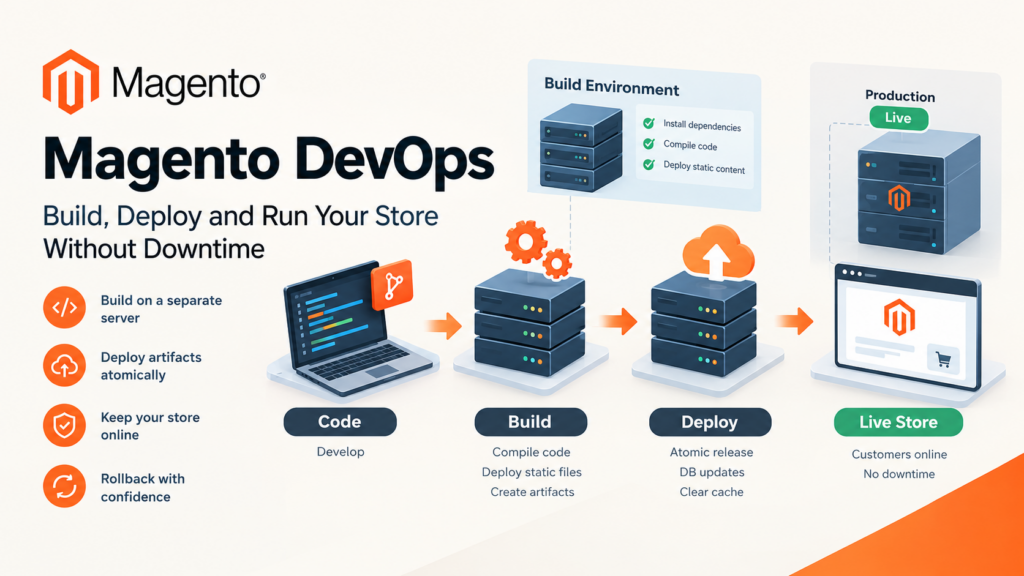
Magento DevOps is the practice of getting code from a developer’s machine to a live store repeatably and without downtime. In Magento 2 that means three application modes, a build step that compiles code and static files, and a deploy step that swaps them in. Most outages come from running the build on the live server.
Key takeaways
- Magento has three application modes — default, developer and production. Production is the only one you should serve customers from.
- Running
bin/magento deploy:mode:set productionon a live store puts it into maintenance mode while it compiles. That’s your outage. - Static content deployment has three strategies — standard, quick and compact — and the default is quick.
- Switching modes wipes
var/cache,generated/code,generated/metadata,var/view_preprocessedandpub/static. - Adobe Commerce on cloud infrastructure supports production and maintenance modes only. Developer mode isn’t an option there.
Magento DevOps gets talked about as if it were a tooling choice — which CI runner, which container setup. It isn’t. It’s a sequencing problem. Magento needs a build phase that generates code and static assets, and that phase is slow and CPU-hungry. Run it on the server that’s also serving customers and you’ve built an outage into every release.
This guide covers the mechanics Magento actually gives you, where the downtime comes from, and how to lay out a pipeline that avoids it. The platform behaviour described here comes from Adobe’s current documentation, verified on the date at the bottom.
What does Magento DevOps actually cover?
Four things, and teams usually have one or two of them solved and the rest improvised.
Environments. Local, integration, staging, production — each with a known Magento version, PHP version and service versions. The point is not tidiness. It’s that a release tested on PHP 8.3 tells you very little about a production box on PHP 8.5.
Build. Dependency install, code compilation, static content deployment. This is deterministic work that produces artifacts. It does not need a database and it does not need to happen on the live server.
Deploy. Putting those artifacts in place, running database schema and data updates, clearing caches. This is the only part that must touch production.
Operations after deploy. Cron, queue consumers, indexers, cache warming, and knowing quickly when something broke.
The gap in most Magento setups is between build and deploy. They’re treated as one long command run over SSH, which is exactly what produces a maintenance page in the middle of a weekday.
What are Magento’s three application modes?
Magento runs in one of three modes, and the mode changes how code and assets behave.
| Mode | Static files | Code compilation | Use for |
|---|---|---|---|
| Default | Generated on demand | Not compiled | Nothing, really — a fallback state |
| Developer | Generated on demand | Not compiled | Local and integration work; verbose errors |
| Production | Served from pub/static | Compiled | Anything customers touch |
Adobe’s documentation is explicit that production mode performs better because static view files are populated in the pub/static directory and because of code compilation.
Check which mode you’re in:
bin/magento deploy:mode:show
Change it:
bin/magento deploy:mode:set {mode} [-s|--skip-compilation]
Two operational details worth knowing. Developer and production modes are recorded in env.php, not the database — so they’re environment configuration, and they belong in your deployment tooling rather than being set by hand. And on Adobe Commerce cloud infrastructure, only production and maintenance modes are supported, so a cloud environment is never going to give you developer mode for debugging.
One more that catches people: all Magento CLI commands must be run by the file system owner. A deploy script running as the wrong user will produce permission damage that’s tedious to unpick.
Why does switching to production mode cause downtime?
Because of what the command does, in order. Run bin/magento deploy:mode:set production and Magento reports, in sequence:
- Enabled maintenance mode
- Static content deployment across each theme and locale
- Template minification
- Class generation and compilation
- Disabled maintenance mode
- Enabled production mode
Maintenance mode is on for the entire middle section. On a real catalogue with several themes and locales, that’s minutes, not seconds — the documentation’s own example output shows thousands of files processed per theme.
So the single most valuable change most teams can make is to stop running that command as part of a release. The compilation and static deployment are build work. They produce files. Produce them somewhere else, then ship the result.
Mode switching also clears several directories — var/cache, generated/metadata, generated/code, var/view_preprocessed and pub/static. Two things survive: .htaccess files, and the file in pub/static that records the static content version. If you have anything else living in those directories, it is gone.
Going the other way, from production back to developer, Adobe advises deleting the contents of generated/code and generated/metadata first to avoid unexpected errors from stale generated classes and proxies:
rm -rf <magento_root>/generated/metadata/* <magento_root>/generated/code/*
How should a Magento deployment pipeline be structured?
The shape that works separates the three phases cleanly.
Phase one, build. On a build agent, not production. Install dependencies, compile, deploy static content. The output is a directory of artifacts. Nothing here touches the database, so it can run in parallel with the live site serving traffic, and it can be repeated identically.
Phase two, deploy. Put the artifacts on the target. The safest pattern is a release directory per deploy with a symlinked current release, because that makes the switch atomic and the rollback instant — you re-point the symlink at the previous release.
Phase three, post-deploy. Schema and data updates, cache invalidation, consumer restarts. This is the part that genuinely needs the live database, and it’s where you want to keep the work minimal.
The awkward item is the database upgrade. Schema changes can’t be made atomic the way file swaps can, which is why safe Magento releases tend to separate destructive schema changes from code releases: ship code that tolerates both old and new schema, migrate, then ship code that assumes the new schema. It’s more steps and fewer 3am incidents.
If you’re containerising any of this, our Magento 2 Docker guide covers the local environment side, which is usually where teams start.
Which static content deployment strategy should you use?
This is a real decision with measurable consequences, and most teams never make it deliberately.
Adobe provides three strategies:
Standard — the regular deployment process. All static view files for all packages are deployed.
Quick — the default. For each theme, one locale is deployed in full. For other locales, files that override the deployed locale are deployed, and everything else is copied from the deployed locale. This minimises deployment time for multi-locale stores at the cost of duplicating a lot of files.
Compact — avoids duplication by storing similar files in shared base subdirectories, organised across three scopes: area, theme and locale. Files land in patterns like <area>/<theme>/<locale> for the most specific case down to base/Magento/base/default for files common to everything.
Compact keeps inheritance relationships in map files — map.php, used by the asset repository to build URLs, and requirejs-map.js, used by the RequireJS baseUrlResolver plugin.
How to choose: single locale, the strategy barely matters. Many locales and plenty of disk, quick keeps builds fast. Many locales and constrained storage — which includes a lot of container registries — compact is what it’s for.
One warning for extension developers that follows directly from compact’s file layout: build URLs to static view files using the asset repository’s createAsset(), never by concatenating URL strings. String concatenation works fine under standard and quick, then breaks under compact when the file isn’t where the string assumed. Our Magento 2 coding standards post covers the wider set of these.
How do you keep configuration consistent across environments?
Configuration is where Magento DevOps gets unglamorous. Settings live in the database, which means they travel with database dumps rather than with code, which means staging and production drift apart quietly.
The workable approach is to decide, per setting, where it belongs. Things that differ per environment — base URLs, API endpoints, credentials, cache backends — belong in environment configuration and should never be set through the admin on production. Things that are part of the application’s behaviour — payment method availability, tax rules, indexer modes — belong under version control so a review can catch a change.
The failure mode to design against is the one where a release works on staging and fails on production because of a setting nobody knew was different. If you can’t explain why staging and production differ, you don’t have a staging environment, you have a second production environment with less traffic.
What breaks most often in Magento releases?
Compiling on the live server. Covered above. It’s the biggest one and the easiest to fix.
Cron not restarted, or running from the wrong user. Cron drives indexing, price rule processing, email sending and queue work. A deploy that leaves cron broken produces symptoms hours later that look nothing like a deploy problem.
Queue consumers holding old code. Long-running consumer processes keep the code they started with. If your deploy doesn’t restart them, they’ll keep executing the previous release until something else kills them.
Indexers left in the wrong mode. Switching an indexer to “update on save” during a bulk import and forgetting to switch back will make your next import appear to hang.
Cache cleared too aggressively. Flushing everything on every deploy means every release is followed by a traffic spike against an empty cache. On a busy store that’s its own outage. Invalidate what changed.
No rollback. If the answer to “what do we do if this is bad” is “roll forward with a fix”, releases become frightening and therefore rare and therefore large and therefore more likely to be bad.
How do you make rollbacks actually work?
Rollback is the capability that changes how a team behaves, so it’s worth building first rather than last.
File rollback is straightforward with release directories and a symlink — the previous release is still on disk, and re-pointing takes milliseconds.
Database rollback is the hard half, and the honest answer is that you mostly don’t. You design so you don’t need to: additive schema changes rather than destructive ones, new columns rather than renamed columns, and a deprecation step that happens a release or two after the code stopped using the old shape. A column dropped in the same release that stopped reading it is a column you cannot get back without a restore.
Keep a verified restore path anyway, and know its duration. “We have backups” is not a rollback plan if nobody has timed a restore.
How does Magento DevOps interact with upgrades?
Version upgrades are the stress test for everything above. Adobe Commerce 2.4.9 is tested with PHP 8.5, while 2.4.8 runs on PHP 8.4 and 8.3 and 2.4.7 on 8.3 and 8.2. A Magento upgrade is therefore usually a PHP upgrade too, which means every extension and every piece of custom code is in scope at once.
The release cadence matters for planning. 2.4.9 was released on 12 May 2026, and 2.4.10-alpha1 followed on 13 October 2026, so the next line is already in motion. If your pipeline can’t stand up a full environment on a new PHP version and run your test suite against it, upgrades will keep being projects rather than routine work.
Our PHP 8.5 and Magento 2.4.9 readiness post covers the compatibility side, and what changed in 2.4.9 covers the release itself.
What should you monitor after a deploy?
Decide what “the release is fine” means before you ship, or you’ll decide it by waiting for a complaint.
The minimum useful set: error rate from application logs, response time on a handful of real page types (home, category, product, cart, checkout), cron last-run timestamps, queue depth, and indexer status. Checkout completion rate is the one business metric worth watching live, because a release that breaks a payment method frequently breaks nothing else visible.
Our Magento store health guide covers the ongoing version of this, and the Black Friday readiness checklist covers the version you want before peak.
How do you build environments that actually match production?
An environment is only useful if a pass on it means something. The way most Magento staging environments fail is not that they’re missing — it’s that they differ from production in a way nobody has written down.
Pin the things that change behaviour. Adobe publishes tested combinations per release, and they are combinations, not a menu: 2.4.9 is tested with PHP 8.5, Composer 2.10, OpenSearch 3, MariaDB 12.3 or 11.8, RabbitMQ 4.3, Valkey 9 and nginx 1.30. Adobe supports only the listed combinations, and states that where your service versions don’t match a supported configuration, behaviour may differ from what it can reproduce — and that support may ask you to align your environment before investigating. So a staging box on a different search engine version isn’t a close-enough approximation; it’s a different system.
Pin data shape too, not just data volume. A staging catalogue of 200 products will not reproduce an indexing problem that appears at 200,000, and a staging database with no customer segments will not reproduce a price rule that only misbehaves for one segment. You don’t need production data — in most jurisdictions you actively shouldn’t have it — but you do need production-shaped data: comparable row counts, comparable attribute counts, comparable store view and website structure.
Finally, pin the deploy path. If staging is updated by someone pulling a branch over SSH and production is updated by a pipeline, staging has not tested your release process. The deployment mechanism is part of what you’re testing.
How do cron, queues and indexers fit into a deploy?
These three are where “the deploy succeeded” and “the store works” come apart, because none of them fails loudly.
Cron drives a long list of things that look unrelated to each other: index refreshes, cart price rule processing, scheduled catalog rules, transactional email, sitemap generation, currency rates. Adobe’s own documentation notes that price rules are processed along with other system rules and that the frequency depends on cron configuration. If cron is stopped — or running as the wrong user, or pointed at the previous release directory after a symlink swap — the storefront keeps serving pages while quietly going stale. Make cron status a post-deploy check, not an assumption.
Queue consumers are long-running PHP processes. They load code at start and keep it. A deploy that replaces files underneath a running consumer leaves it executing the old release indefinitely, which produces the particularly confusing symptom of a bug you already fixed still happening. Restart them as an explicit deploy step, and make sure the restart is ordered after the symlink swap, not before.
Indexers have two modes, and the wrong one at the wrong time is expensive in both directions. Update-on-save during a bulk import turns every product write into a reindex. Update-by-schedule during a release means your changes aren’t visible until cron catches up. Neither is wrong in general; what’s wrong is not knowing which one you’re in. Record the expected mode per environment and check it after deploy.
The common thread: all three fail silently and all three are cheap to check. A deploy script that ends by printing cron’s last run, consumer process count and indexer states costs ten lines and catches most of this.
How do you test a Magento release?
Test effort should follow blast radius, not code volume.
Always, automatically: static analysis and coding standards, unit tests on your own modules, and a build that proves the thing compiles and deploys static content without errors. That last one sounds trivial and catches a surprising amount, because compilation failures are a common consequence of a bad dependency injection change.
Always, before production: a smoke path through the storefront — home, category, product, add to cart, checkout to the payment step — on the target PHP version. If you automate one thing beyond unit tests, automate this. Checkout is where a broken release costs money per minute.
When the release touches them: payment methods against a sandbox, shipping rate calls, tax calculation at your real rates, and any integration with an external system. These are the areas where a unit test passing tells you almost nothing, because the failure mode is a contract mismatch with someone else’s service.
Before an upgrade specifically: the full suite on the new PHP version, plus a pass over every third-party extension. This is the step that determines whether a version upgrade takes a week or a quarter, and skipping it is how teams end up stranded several releases behind.
What do most guides on Magento DevOps miss?
They present mode switching as a deployment step. It isn’t. It’s a slow, destructive operation that includes a maintenance window, and treating it as routine is the root of most Magento release downtime.
They don’t mention the static content strategy choice. Three strategies with genuinely different trade-offs, a non-obvious default, and a real compatibility gotcha for extension code under compact. Almost no article names them.
They skip the cloud constraint. Adobe Commerce on cloud infrastructure supports production and maintenance modes only. Advice built around developer mode doesn’t apply there.
They treat the database as an afterthought. File deploys are the easy half. Schema change strategy is what decides whether rollback exists.
Glossary
Application mode — default, developer or production; controls static file generation and code compilation.
Static content deployment (SCD) — the build step that publishes CSS, JS, images and fonts into pub/static.
Compilation — generation of proxies, factories and interceptors into generated/.
Build artifact — the output of the build phase; the thing you deploy, rather than source you compile on the target.
Atomic deploy — swapping a symlink so the new release becomes live in one indivisible step.
Maintenance mode — the state Magento enters to block storefront traffic while schema or asset work happens.
Release directory — a dated or hashed folder holding one deployed build, kept so the previous one can be restored instantly.
Frequently asked questions
What is Magento DevOps?
The practice of building, deploying and operating a Magento store repeatably — environments, a build phase that compiles code and static files, an atomic deploy, and the operational work after it.
Should Magento production run in developer mode?
No. Production mode exists because static files are pre-populated and code is compiled, which is where the performance comes from. On Adobe Commerce cloud infrastructure, developer mode isn’t available at all.
Why does my site go down during deployment?
Most likely you’re running deploy:mode:set production or static content deployment on the live server. Both enable maintenance mode while they work. Move them to a build step.
Which static content deployment strategy is the default?
Quick. Standard deploys everything per locale; compact minimises disk use by sharing files across area, theme and locale scopes.
What gets deleted when I switch modes?
var/cache, generated/metadata, generated/code, var/view_preprocessed and pub/static — except .htaccess files and the file recording the static content version.
Do I need Docker for Magento DevOps?
No. Containers help make environments reproducible, but the sequencing — build off-server, deploy atomically, keep schema changes additive — matters far more than the tooling.
How do I roll back a Magento release?
Files roll back by re-pointing the symlink to the previous release directory. Databases generally don’t roll back, which is why schema changes should be additive and destructive changes deferred.
Why did my extension’s images break after a deploy?
A common cause is building static URLs by string concatenation, which stops working under the compact strategy. Use the asset repository’s createAsset() instead.
Where to go from here
Pick the single highest-value change first: move compilation and static content deployment off the production server. On most stores that alone removes every planned maintenance window from the release process, and it doesn’t require new tooling — just running the same commands somewhere else and shipping the result.
After that, build rollback before you build anything fancier. A team that can undo a release in thirty seconds ships smaller changes more often, and smaller changes are what make the rest of this easy.
If you’d like help setting it up, our Magento development team does this as a defined piece of work, and you can hire Magento developers to run it alongside your own team.