

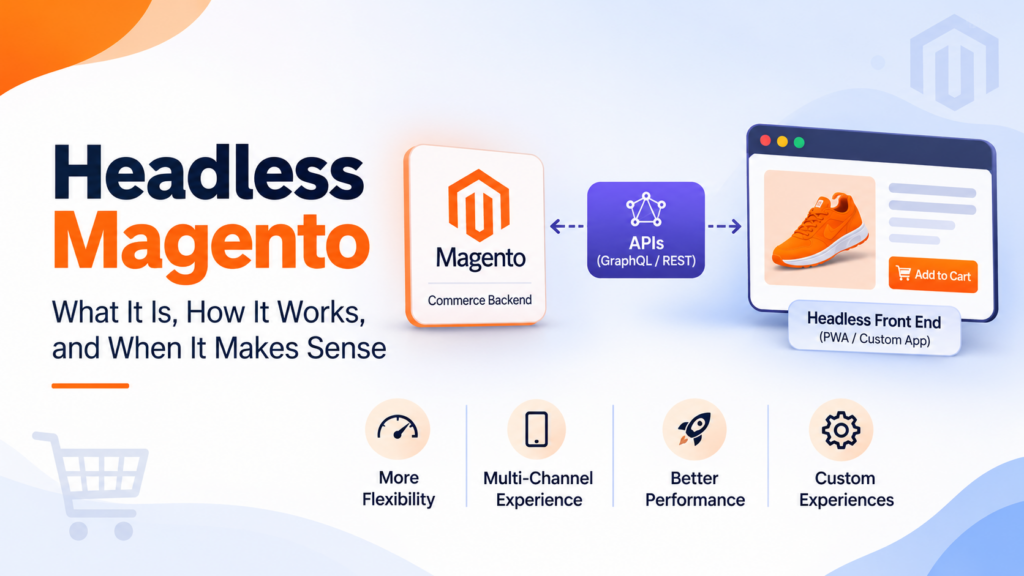
Headless Magento means keeping Magento (Adobe Commerce or Open Source) as the commerce back end while a separate front end handles what shoppers see, talking to it through APIs such as GraphQL. It gives you front-end freedom, but you take on more build and upkeep. For many stores, a fast themed front end is enough.
Key takeaways
- “Headless” splits the storefront from the commerce engine. Magento keeps catalog, cart, orders and customers. A separate app renders the pages.
- Adobe’s GraphQL is the main way headless front ends talk to Adobe Commerce and Magento Open Source.
- Adobe now describes two GraphQL implementations: one for PaaS (cloud and on-premises) projects and one for SaaS projects. They differ in schema and endpoint.
- The PaaS core, B2B and service-based schemas don’t natively interact. Adobe says they can be integrated with API Mesh.
- Headless costs more to build and to keep running, because you now own a second application.
- A well-built themed front end can solve many speed and design problems without going headless.
- Decide on business needs, not fashion: multiple front ends, custom experiences, or a team that already works in modern JavaScript frameworks.
What is headless Magento?
Headless Magento is a setup where the storefront is decoupled from the Magento back end. Magento still manages products, prices, carts, customers and orders. A separate front-end application, built with whatever tools your team picks, shows the pages and calls Magento’s APIs for data.
In a traditional Magento store, the theme and the back end live in one application. The server builds pages and sends them to the browser. In a headless store, the “head” (the front end) is its own project, with its own code, hosting and release cycle. The “body” (Magento) exposes data and actions through APIs.
Adobe’s documentation describes GraphQL as a data query language and runtime and positions it as a foundation for building headless storefronts and mobile applications. The client asks for exactly the fields it needs and gets them back in one response, which suits a custom front end.
It helps to separate three things people often lump together:
| Term | What it means |
|---|---|
| Headless | The front end is separate from the commerce back end and talks to it through APIs |
| Progressive web app (PWA) | A web app that uses modern browser features to feel app-like. It’s one possible type of headless front end |
| Themed front end | A front end that lives inside Magento as a theme, such as a Luma-based or Hyvä-based theme |
So “headless PWA for Magento 2”, a phrase some people search for, describes one specific flavor: a separate front end that behaves like an app. Our older post on why to choose Magento headless commerce covers the concept, and our comparison of Hyvä vs PWA Studio looks at two paths side by side.
How does headless Magento talk to the front end?
Through APIs. Adobe’s developer docs lead with GraphQL, and Magento also offers REST. Our short explainer on REST API vs GraphQL covers the difference, and our post on Magento API capabilities is a good primer.
Here’s what Adobe’s GraphQL overview says, in plain terms.
Two implementations. Adobe Commerce provides two GraphQL implementations. One is for Adobe Commerce on cloud and on-premises projects, which Adobe calls PaaS. The other is for Adobe Commerce as a Cloud Service, which Adobe calls SaaS.
PaaS schemas. PaaS projects can use the GraphQL schemas that have long been available to Adobe Commerce and Magento Open Source projects. Adobe describes separate schemas for core and B2B functionality and for service-based features, including Catalog Service, Live Search and Recommendations. Adobe says these schemas don’t natively interact, but can be integrated with API Mesh.
SaaS supergraph. SaaS projects connect to a supergraph that combines and streamlines the schemas available to PaaS projects. Adobe says it gives instant access to the latest features added in the Storefront Compatibility Package and other sources, so SaaS projects can use the latest GraphQL features without waiting for a new release.
Deprecations. If you migrate from PaaS to SaaS, Adobe notes that the SaaS schema removes all deprecated queries, mutations and fields.
Endpoints. Adobe lists the PaaS endpoint as https://<commerce-server>/graphql and the SaaS endpoint as https://<region>-<environment>.api.commerce.adobe.com/<tenantId>/graphql.
Tooling. Adobe suggests GraphQL clients such as GraphiQL, Altair and Apollo Studio, and notes you can use introspection queries to explore the schema.
The practical point is this. Before anyone designs your headless front end, you need to know which flavor you’re on, because the schema, the endpoint and the available features differ. If your agency can’t tell you whether your project is PaaS or SaaS in the first meeting, slow down.
When does headless Magento pay off?
Headless pays off when your needs go beyond what a themed front end can deliver, and when you can afford to run two systems. These are the situations where we think it makes sense. They’re our view, not an Adobe rule.
You need more than one front end
If you plan to serve a website, a mobile app, in-store screens or partner portals from the same catalog, an API-first approach helps. One back end, several front ends. Adobe’s GraphQL overview specifically mentions headless storefronts and mobile applications as targets.
You need a fully custom experience
Some brands want interactions a theme can’t deliver easily: unusual product configurators, rich editorial commerce, or app-like flows. A separate front end gives developers full control over the markup, the routing and the interactions.
Your team already works in a modern JavaScript framework
If your in-house developers build in a JavaScript framework every day, a headless front end fits their skills. If they know Magento themes best, a theme-based front end keeps work in familiar territory.
You need to ship front-end changes independently
A separate front end can be released on its own schedule, without a Magento deployment. That can speed up design changes. It also means you have two release pipelines to manage.
You’re moving to a SaaS or service-based setup
Adobe’s overview shows that service-based features like Catalog Service, Live Search and Recommendations have their own schemas, and the SaaS supergraph combines schemas. If you’re heading in that direction, API-first front ends are a natural fit. Check the details for your own project with Adobe.
When is headless Magento the wrong choice?
Headless is the wrong choice when your main goals are speed, a modern look and an easier build, because a themed front end can often deliver those for less. It’s also wrong when your team is small or your budget is tight.
You mainly want a faster store
Speed is the most common reason people ask about headless, and it’s often the wrong reason. A modern themed front end can be fast without a separate application. Our Hyvä vs Luma comparison explains how a lighter front-end approach changes the picture. Our Hyvä performance optimization and Hyvä theme customisation pages describe what that route looks like in practice.
Slow stores are often slow because of heavy third-party scripts, unoptimized images, poor hosting or a bloated theme. Moving to headless doesn’t remove those causes. It can add new ones, like client-side rendering that delays the first content.
Your extensions are the experience
A lot of Magento’s value comes from its ecosystem of extensions. Many extensions add front-end features, such as banners, layered navigation, reviews, wishlists and checkout steps. In a headless build, each of those needs an API route and a front-end rebuild. Before you choose headless, list every extension that touches the storefront and ask how each will work.
You don’t have the people to run two systems
Headless means a Magento project plus a front-end project. Each needs hosting, monitoring, security updates and developers who understand it. If your team is already stretched, a second application can make things worse.
Your catalog and design are straightforward
A store with a conventional layout, a normal catalog and standard checkout doesn’t gain much from a custom front end. A good theme is cheaper and easier.
You haven’t fixed the basics
If product data is messy, search is weak and pages are cluttered, a new front end won’t fix it. Sort out the foundations first.
How does headless compare with a Hyvä theme?
They solve different problems. Hyvä is a front-end approach inside Magento. Headless is an architecture that separates the front end from Magento. Choosing between them is a question about how much freedom and how much responsibility you want.
| Question | Themed front end (such as Hyvä) | Headless front end |
|---|---|---|
| Where does the front end live? | Inside Magento as a theme | In a separate application |
| How does it get data? | Through Magento’s own rendering | Through APIs such as GraphQL |
| Extensions | Many front-end extensions have theme-level support or compatibility options; check each one | Each front-end feature may need rebuilding against the API |
| Team skills | Magento theme development | Modern JavaScript framework plus Magento API knowledge |
| Releases | One application | Two applications, two pipelines |
| Best for | Speed and design improvements with less change | Multiple front ends or fully custom experiences |
Our earlier coverage reported Hyvä going open source on 10 November 2025, which can change its cost picture. Read our post on Hyvä going open source for context, and check Hyvä’s current licensing terms before you plan a budget. For many stores, we’d start the conversation with a themed front end and only move to headless when there’s a clear reason.
What does a headless project involve?
A headless project involves more moving parts than a theme project. Here’s the typical shape. It’s our description of a common pattern, not a standard.
- Discovery. Define goals, front ends, extensions, integrations and success metrics.
- API audit. Check which Magento data and actions your front end needs, and whether the GraphQL schema covers them. Adobe’s docs say to explore the schema in a GraphQL IDE and use introspection queries.
- Architecture. Decide the front-end framework, hosting, caching, search, content management and how pages are rendered.
- Back-end preparation. Confirm your Magento version, patch level and extension compatibility.
- Front-end build. Build pages, components, cart, checkout and account areas.
- Integration. Connect payments, shipping, tax, analytics and marketing tools.
- Testing. Check performance, accessibility, SEO and every checkout path on real devices.
- Launch and monitoring. Plan redirects, cache, rollback and observation.
Two items are easy to underestimate: checkout and SEO.
Checkout
Checkout is the most sensitive part of any store. Payment methods, shipping rules, tax and promotions all meet there. In a headless setup, you decide whether to build a custom checkout, use a hosted one or use Magento’s own. Each option has trade-offs in control, security responsibility and effort. Our guide to Hyvä Checkout vs one-step checkout is a useful companion if you’re weighing options.
SEO
A separate front end has to handle everything search engines and shoppers expect: crawlable HTML, canonical tags, structured data, sitemaps, redirects and fast rendering. If the front end builds pages mostly in the browser, search engines and AI crawlers may see less than a person does. Our ecommerce migration SEO checklist covers the checks, and our AI search visibility checklist is worth reading if you care about answer engines.
How should you test a headless proof of concept?
A proof of concept should answer one question: does the headless version beat the current store on something that matters to your business? Pick the measures before you build, so you don’t choose them after the results come in.
Good measures for a product page test include:
- Largest Contentful Paint (LCP). When the biggest element in the first screen finishes rendering. On a product page, that’s usually the main image.
- Cumulative Layout Shift (CLS). How much the page jumps around while loading.
- Interaction to Next Paint (INP). How quickly the page responds after a tap or click, which matters for filters, variant pickers and add-to-cart.
- Crawlable content. Whether the key text, price, availability and structured data are present in the HTML a crawler receives, not only after scripts run.
- Business numbers. Add-to-cart rate and conversion rate, compared against the current page over the same period.
On the rendering point, Shopify’s own theme performance guidance is a useful parallel from another platform. It says moving hero content, product info or navigation into client-side JavaScript delays LCP and harms SEO, because server-rendered content is available before the browser does anything. It adds that if a framework is truly required, server-side rendering is the route. The same logic applies to a headless Magento front end: render the essential content on the server, and keep client-side code for interactions.
Run the test on real devices with realistic network throttling, and on your real catalog, not a demo set of ten products. If the proof of concept doesn’t clearly beat your current page, you’ve learned something valuable for a fraction of the full cost.
What should you ask an agency before you sign?
Ask questions that force specifics. Vague answers on any of these are a warning.
- Which Adobe Commerce flavor are we on, PaaS or SaaS, and which GraphQL schemas will the front end use? The answer should name the endpoint type and the features involved.
- How will core, B2B and service-based data be combined? On PaaS, Adobe says these schemas don’t natively interact, so ask whether API Mesh or another approach is planned.
- Which of our extensions touch the storefront, and how will each one work? You want a written list, not a promise.
- How will pages be rendered for search engines and AI crawlers? Ask for a sample page’s raw HTML.
- Who builds checkout, and who is responsible for its security? Get a named owner.
- What are the monthly maintenance tasks for both applications? Include Magento patching.
- What will we own at the end? Ask for repository access, hosting accounts and documentation.
- What happens if we want to change front-end framework later? A clean API layer makes that easier.
If you want a second opinion on a proposal, our team can review it. Reach out through our contact page and share the scope.
What are the hidden costs and risks?
The visible cost of headless is the build. The hidden costs are everything that comes after. We aren’t quoting figures because they depend on your project, but you should ask about each of these.
- Two codebases to maintain. Both need updates, security reviews and monitoring.
- Magento patching still applies. The back end still needs monthly security patches. Our APSB26-138 patch guide shows the monthly rhythm.
- API changes. Schemas evolve. Adobe’s overview notes that SaaS removes deprecated queries, mutations and fields, so front ends built against older fields need attention when you move.
- Extension gaps. Some storefront extensions won’t work without extra development.
- Preview and editing. Marketers often lose some visual editing convenience unless the team builds or buys a content layer.
- Hosting and caching. A front end needs its own hosting, and caching strategy matters for speed.
- Skill concentration. If one developer knows the front end, you have a single point of failure.
None of this means “don’t go headless”. It means budget for the whole life of the project, not just the launch.
How do you decide? A simple scorecard
Score each statement from 0 (not true) to 2 (very true). This is our own tool, built to start a conversation. It isn’t a standard.
| Statement | Score |
|---|---|
| We need to serve more than one front end from the same catalog | 0 / 1 / 2 |
| Our design needs go beyond what a good theme can deliver | 0 / 1 / 2 |
| We have developers experienced in a modern JavaScript framework | 0 / 1 / 2 |
| We can fund and staff two applications over the long term | 0 / 1 / 2 |
| We’ve already fixed images, scripts, hosting and caching on the current front end | 0 / 1 / 2 |
| Our key extensions have a clear route to the API | 0 / 1 / 2 |
If you score mostly 0 and 1, start with a themed front end. If you score mostly 2, a headless discovery phase is worth the money. A mixed score suggests a smaller proof of concept: build one page type, such as the product page, and measure what you gain.
A hypothetical example
This is an invented scenario, not a client story.
A merchant sells configurable furniture on Magento. The product page needs a visual configurator with live pricing, and the brand wants the same catalog in a mobile app. Their developers already use a JavaScript framework daily. Their Magento version is current and patched.
For this merchant, headless makes sense: two front ends, a custom interaction and a team that can run it. They begin with a discovery phase, audit the GraphQL schema for configurable products, and build the product page first as a proof of concept.
Now a second merchant sells everyday homewares. The theme is slow, the site is cluttered, and the team is two people. They don’t need two front ends. They need a lighter theme, cleaner scripts and better hosting. A themed front end fits.
Same platform, different answers.
What do the top results miss about headless Magento?
Plenty of articles list benefits like “flexibility” and “speed” and stop. Here’s what’s often missing.
The two flavors of GraphQL. Adobe documents separate PaaS and SaaS implementations with different schemas and endpoints. Many guides talk about “the Magento API” as if it were one thing.
The schema split. On PaaS, core and B2B schemas and service-based schemas don’t natively interact. Adobe says you can integrate them with API Mesh. That’s extra architecture to plan for.
The cost of the second application. Articles talk about build cost, not about running two codebases for years.
The alternative. A well-built themed front end can solve many problems. Headless isn’t the only route to a modern store.
The extension question. The storefront features your team relies on may need rebuilding.
The back end still needs care. Headless doesn’t remove patching, upgrades or hosting for Magento.
Common mistakes
- Choosing headless to fix speed alone. Check images, scripts, hosting and caching first.
- Skipping the API audit. Find gaps in the schema before you design.
- Ignoring SEO. Make sure the front end delivers crawlable content.
- Underestimating checkout. Decide early how it’ll be built.
- Forgetting the monthly patches. The back end still needs them.
- Not asking which GraphQL flavor. PaaS and SaaS differ.
- Letting one person hold all the knowledge. Document the architecture.
A short checklist
- Write down why you want headless, in one sentence.
- Confirm your Magento version, patch level and whether you’re PaaS or SaaS.
- List the front ends you need.
- List storefront extensions and how each will work.
- Check the GraphQL schema for the data you need.
- Decide who builds and runs the front end.
- Plan checkout, SEO and analytics early.
- Start with a proof of concept on one page type.
- Budget for two applications over time.
- Compare the plan against a themed front end.
If you’d like help deciding, our Magento 2 headless development page explains how we approach it, and our Magento development services cover the back end. You can contact our team with your goals, and we’ll tell you honestly whether headless is worth it for you.
Frequently asked questions
What is headless Magento?
It’s a setup where Magento handles catalog, cart, customers and orders, and a separate front-end application handles the storefront. The two communicate through APIs such as GraphQL.
Does headless Magento use GraphQL?
Adobe’s developer documentation presents GraphQL as the foundation for headless storefronts and mobile applications on Adobe Commerce. Magento also supports REST, and the right choice depends on your project.
What’s the difference between PaaS and SaaS GraphQL in Adobe Commerce?
Adobe describes two implementations. PaaS covers cloud and on-premises projects and uses separate schemas for core, B2B and service-based features. SaaS projects connect to a supergraph that combines the schemas and provides the latest features. The endpoints differ too.
Is headless Magento faster?
Not automatically. Speed depends on how the front end renders pages, how images and scripts are handled, hosting and caching. A well-built themed front end can also be fast. Test before you assume.
Is a PWA the same as headless?
No. A PWA is one kind of front end that behaves like an app. A headless setup can use a PWA or other front-end approaches.
Is headless Magento better than Hyvä?
They answer different questions. Hyvä is a front-end approach within Magento. Headless separates the front end entirely. Many stores get what they need from a themed front end, while stores with several front ends or fully custom needs may benefit from headless.
Does headless Magento need extra security work?
You still need to patch Magento, and you now maintain a second application too. Check each layer: the back end, the front end, the API and the hosting.
How do I start?
Write down your goals, confirm your Magento version and flavor, audit the GraphQL schema and list your storefront extensions. Then compare headless with a themed front end, and consider a small proof of concept.
The bottom line
Headless Magento is a powerful option, not a default. It suits stores that need several front ends, truly custom experiences and a team that can run two applications. For many others, a clean, fast themed front end delivers most of the benefit with less to maintain.
Before you spend on a build, write down the one reason you want headless. If you can’t finish that sentence, or the answer is just “speed”, test a lighter theme first. If the reason is solid, start small: audit the API, build one page, and measure what changes.