

Advanced Custom Links

1 Review Add Review

The Advanced Custom Links extension for Magento 2 enables the admin to manage top navigation and My Account sidebar links from the backend. It allows setting a custom root category for top navigation and adding custom links before or after specific category links. Change the root category for Top Navigation Add custom links in Top Navigation at any level Set the position of custom links in Top Navigation i.e. to be shown before/after/inside any existing category Add/Update custom links in Customer My Account sidebar Set the position of custom and existing links in Customer My Account sidebar by assigning them a unique number

restapi Rest API Compatible
restapi Marketplace Verified
restapi B2B Compatible

Magento Version Compatibility:

check-mark

Magento Community: 2.4.4 - 2.4.7-p1

check-mark

Adobe Commerce: 2.4.4 - 2.4.7-p1

FREE installation
$39.00
check-mark Lifetime access to source code.
check-mark 1 Year Access to Free Technical Support
check-mark 1 Year Access to Free Updates
check-mark No Hidden Fees. Transparent Policy.
check-mark 30 days money back guarantee
  • chevron-double-right Feature Highlights
  • chevron-double-right All Features & Screenshots
  • chevron-double-right Description
  • chevron-double-right Release Notes
  • chevron-double-right What User Say About Us
  • chevron-double-right Ask Us Your Query

Feature Highlights

  • check-mark Change the root category for Top Navigation to show its child categories as level-0 categories in Top Navigation.
  • check-mark Add custom links in Top Navigation.
  • check-mark Custom links can be added at any level in Top Navigation.
  • check-mark Set the position of custom links in Top Navigation i.e. to be shown before or after any existing category.
  • check-mark Add custom links in Customer My Account sidebar.
  • check-mark Update existing links in Customer My Account sidebar.
  • check-mark Set the position of custom and existing links in Customer My Account sidebar by assigning them a unique number.
  • check-mark Easy to install and manage from Magento backend.

All Features & Screenshots

Enable option easily with store configuration.

You can manage the settings for Advanced Custom Links by navigating to Stores > Configuration > WebbyTroops > Advanced Custom Links. It is easy to enable the module — simply select the category to be used as the root category, and it will display the navigation menu on the frontend.
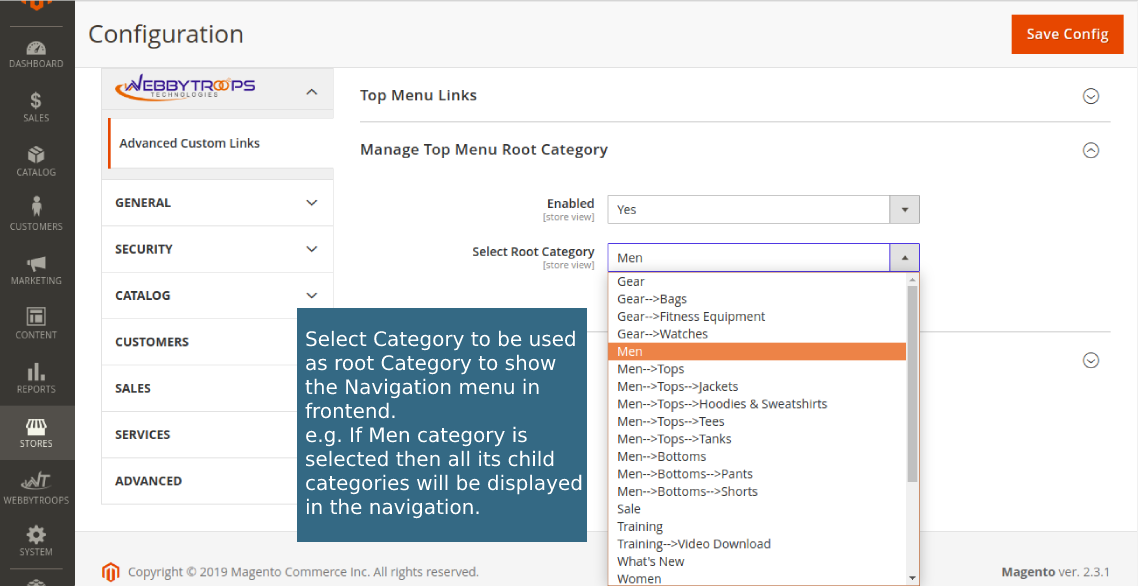
Enable option easily with store configuration.Enable option easily with store configuration.

Customer Account Sidebar

This configuration allows you to add and manage custom links in the customer’s account section. You can set a title for the link, define its URL (either a Magento path or a full URL), and choose its display position. Existing links can also be updated by keeping the same URL and changing only the title or position. This helps in easily customizing the sidebar with useful links like policies, help pages, or order history.
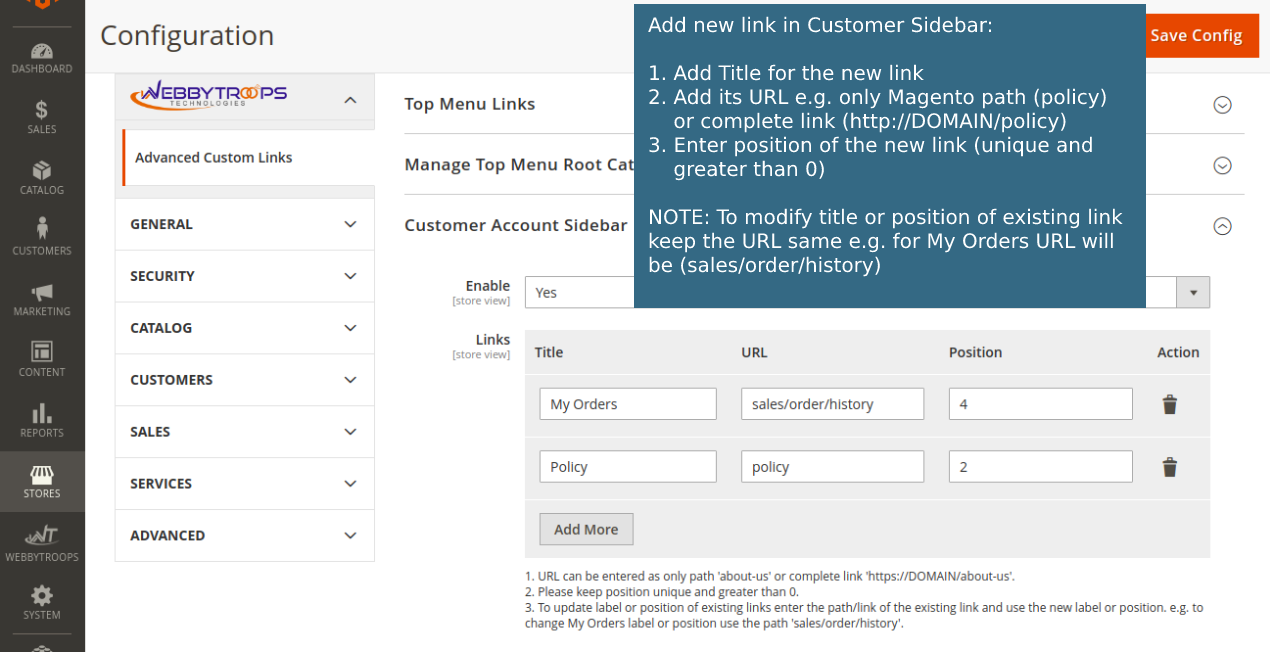
Customer Account SidebarCustomer Account Sidebar

Add Top Menu Link

This configuration allows you to add and manage custom links in the store’s top navigation menu. You can enter a title for the link, provide a URL and assign a parent menu under which the link will appear. You can also define the position of the link relative to the parent menu, choosing whether it should display before, after, or inside the parent item. This makes it easy to organize and customize your storefront navigation with additional links such as custom pages, categories, or external resources.
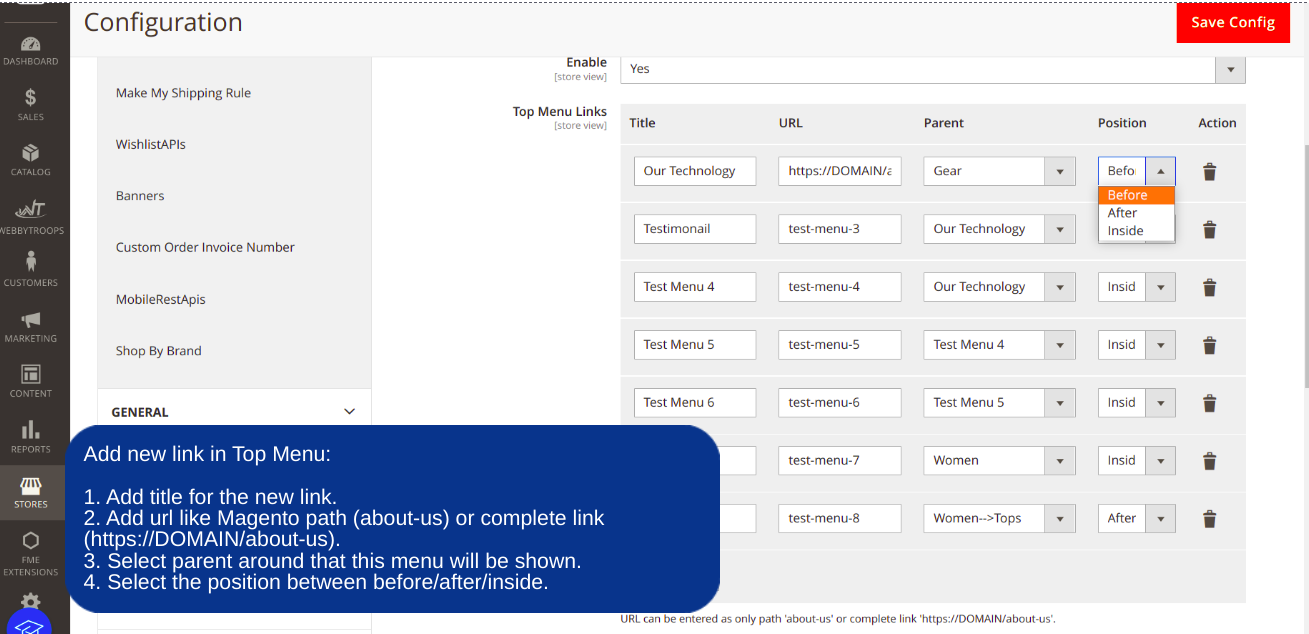
Add Top Menu LinkAdd Top Menu Link

Show link in My Account section

The image shows how custom links and modified existing links appear in the Customer Account Sidebar on the frontend. A new custom link called Policy has been added, and the position of the existing My Orders link has been changed.
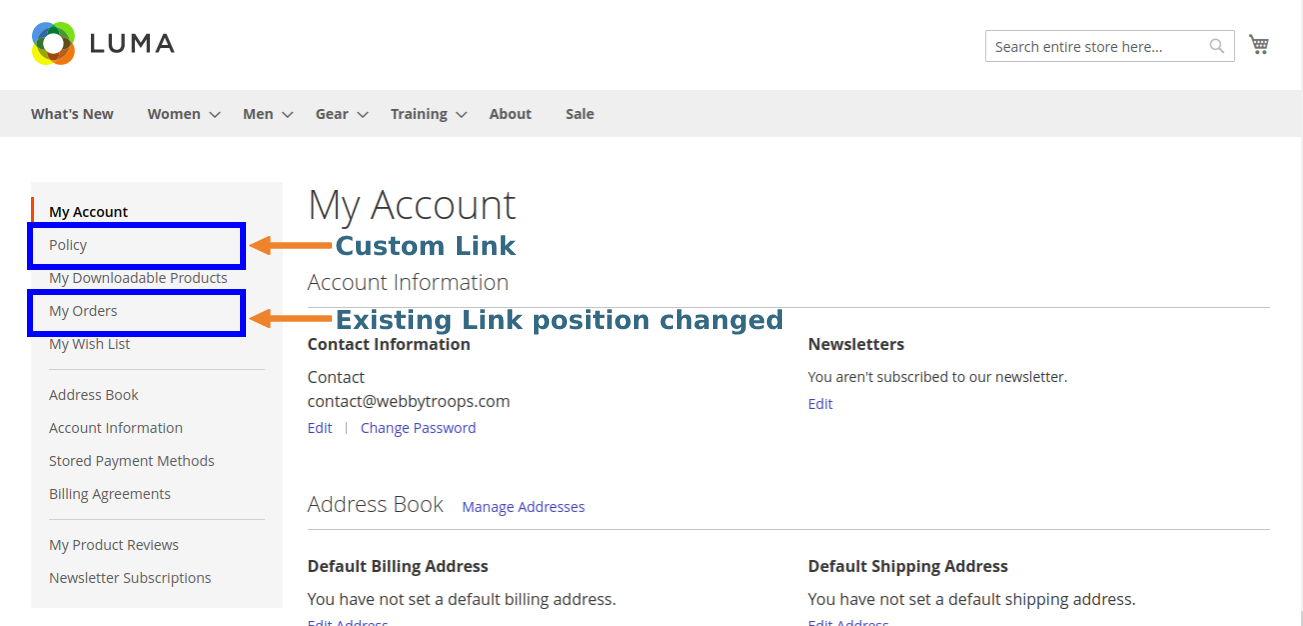
Show link in My Account sectionShow link in My Account section

Add link in menu bar

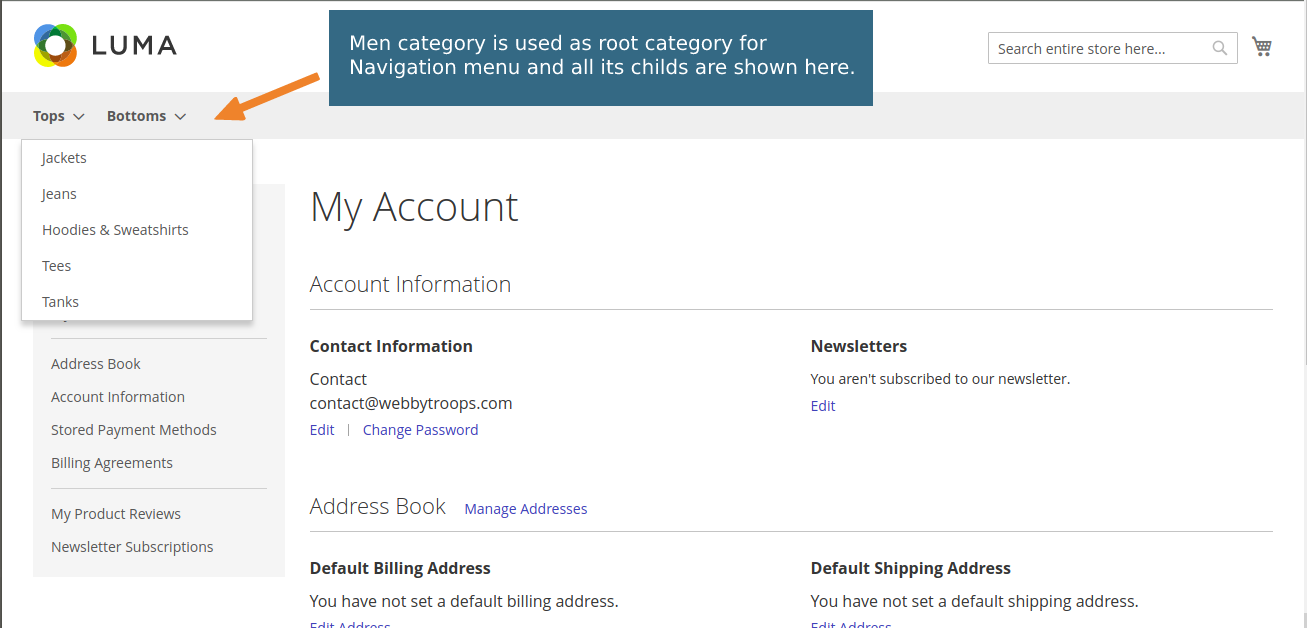
This image shows the navigation menu where the Men category is set as the root category, and all its child categories are displayed in the top menu for easy product browsing.
Add link in menu barAdd link in menu bar

Show custom link mid of menu

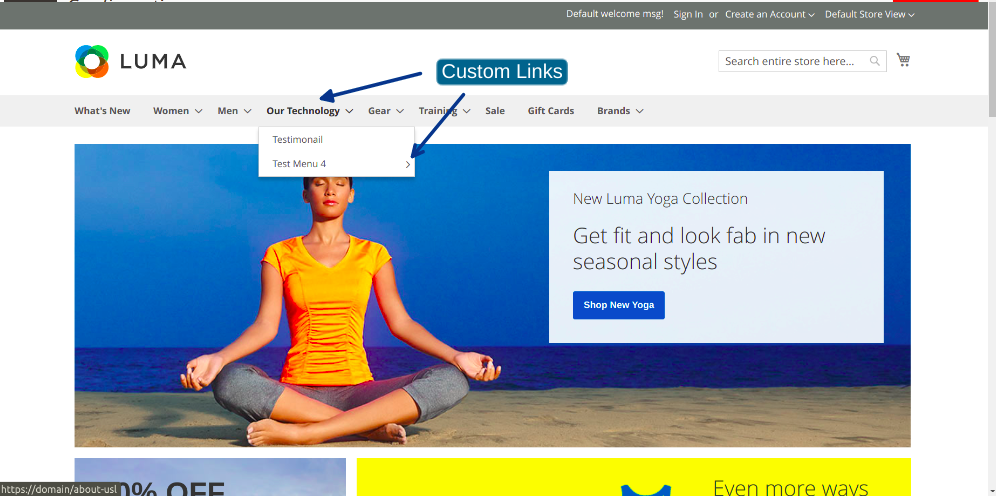
A custom link can be added and displayed in the middle of the top navigation menu. In this example, the Our Technology link is placed between existing menu items, and it also includes sub-links (Testimonial and Test Menu 4). This allows you to insert custom navigation items anywhere in the menu for better organization and visibility.
Show custom link mid of menuShow custom link mid of menu

Description

Advanced Custom Links extension for Magento 2 will allow the Admin to manage Top Navigation and Customer My Account Sidebar links from the backend. The admin can easily change the root category to be used for top navigation so that child categories of the selected root category will be visible there. Custom Links can also be added to the top navigation at any place by selecting its position to show before or after any particular existing category link.

Customer My Account sidebar links can also be managed using this. Custom links can be added at any position in sidebar. Also, existing links can be re-positioned and their titles can be changed.

Example: If a client wants to manage top navigation and customer my account sidebar from backend itself. Advanced Custom Links extension provides the feature to manage it in a very effective manner. Any modification in the links can be done in very less time as this module provides you the flexibility to manage these links from the backend.

Support & Discussion:

We are continuously working on enhancing and updating this module and will have updates in the future.  For support or questions,  please contact us at any time:  contact@webbytroops.com

Release Notes

Version number : 1.0.3

Compatible with Open Source (CE) : 2.2.x, 2.3.x, 2.4.x
Stability : Stable Build

Features

  • check-mark Bug fixes and code optimisation.

Version number : 1.0.2

Compatible with Open Source (CE) : 2.2.x, 2.3.x, 2.4.x
Stability : Stable Build

Features

  • check-mark Support added for Magento 2.4.

Version number : 1.0.1

Compatible with Open Source (CE) : 2.2.x, 2.3.x, 2.4.x
Stability : Stable Build

Version number : 1.0.0

Compatible with Open Source (CE) : 2.2.x, 2.3.x, 2.4.x
Stability :Stable Build

Version number : 1.1.0

Compatible with Open Source (CE) : 2.2.x, 2.3.x, 2.4.x
Stability : Stable Build

Features

  • check-mark New enhancement as now admin can add new custom menu as sub menu of any existing menu

What Users Say About Us

Great Work + Great Extension
Quality
Great people to work with. Their extension does exactly what it says, and they are responsive if issues come up, or if additional customization is needed. Really glad to have found it!

1 Item

Write Your Own Review
You're reviewing: Advanced Custom Links
loader
Loading...

You submitted your review for moderation.

Ask Us Your Query